
How to Prompt AI for User Research
Let AI handle the tedious jobs. You focus on what actually matters: the people and the insights they reveal.
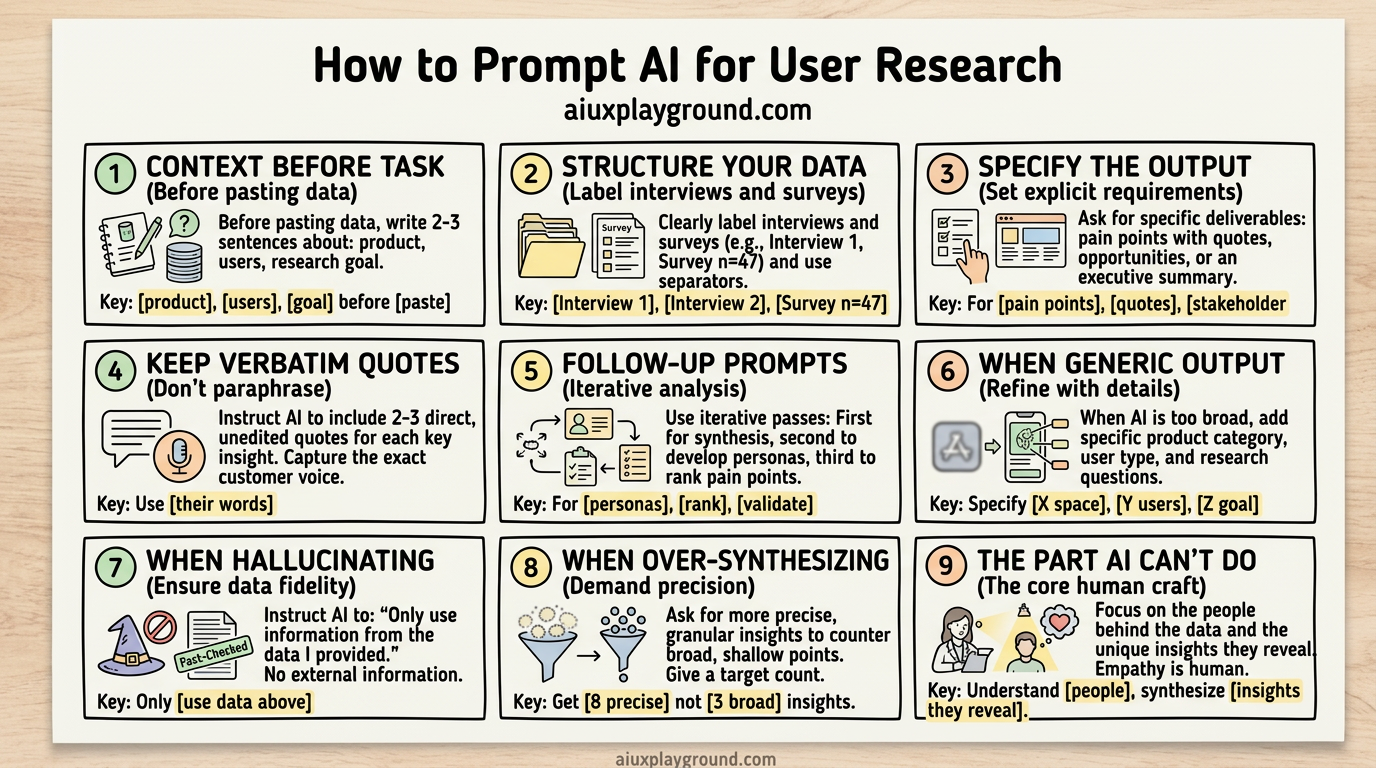
The best user research I've seen didn't come from the fanciest tools. It came from people who knew how to listen, how to ask, and how to turn a room full of notes into something a team could actually use.
AI doesn't replace that. But it can help with the part that usually drags: synthesis. Turning 10 interview transcripts into themes. Turning survey data into a story. Turning "what did we learn?" into "here's what we should do."
The catch: AI only helps if you know how to talk to it. And prompting for research is different from prompting for code or copy.
Here's what I've learned.
Start with context, not the task
The biggest mistake is dumping raw data and asking "synthesize this."
AI doesn't know your product. It doesn't know your users. It doesn't know what you're trying to learn. Without that, you get generic output: the kind that could apply to any product.
Before you paste anything, write 2–3 sentences:
That's it. Product, users, goal. Now the AI has something to anchor to.
Structure your data before you paste it
AI works better with structure than with a wall of text.
Instead of one long block, label things:
If you have journey maps, screenshots, or analytics, say so. "We also have a journey map from the last sprint. Should I share it?" Often yes. Context improves the output.
For journey mapping specifically, I use a structured prompt template that asks for stages, touchpoints, and pain points. It keeps the output usable instead of vague.
Ask for the structure you actually need
"Synthesize this" is too vague. Different stakeholders need different things.
For a design team, you might want: top 3–5 insights, pain points with evidence (quotes), opportunities ranked by impact. For leadership, you might want: executive summary, main themes, recommended next steps. For a sprint, you might want: user needs as "How might we…" statements, quick wins vs. longer-term bets.
So say what you need. For example:
The AI will follow the structure you give it.
I keep a User Research Synthesis prompt in my library for exactly this. It's built for design teams and stakeholder decks. Copy it, adapt the structure to your audience, and you're set.
Keep the human voice
Research is powerful because of real quotes. "It takes me 20 minutes to find one SKU" hits differently than "users report difficulty locating inventory."
Tell the AI to keep quotes verbatim. Something like:
That keeps the synthesis grounded in what people actually said.
Use follow-up prompts to go deeper
First pass: get the synthesis. Second pass: go deeper.
Each follow-up builds on the last. You're not re-explaining the data; you're refining the story.
For personas, I use this prompt. It pulls from your synthesis and keeps personas grounded in real data instead of stereotypes.
For survey data specifically, the Survey Analysis Framework helps structure quantitative results so they connect to qualitative insights.
When it goes wrong
If the output is too generic ("Users want a better experience"), that usually means not enough context. Add: product category, user type, specific research questions. Try: "We're in [X] space. Our users are [Y]. We were trying to understand [Z]."
If it hallucinates (inventing quotes or themes that aren't in the data), mitigate by asking: Only use information that appears in the data I provided. If something isn't there, say "not enough data" instead of inferring.
If it over-synthesizes (eight distinct points become three vague ones), ask for more granularity: Break this into more specific insights. I'd rather have 8 precise points than 3 broad ones.
A prompt you can use today
Here's a structure I use:
Copy that. Swap in your product, method, and goal. Paste your data. Adjust the structure if your audience needs something different.
The part AI can't do
AI can help you organize and summarize. It can't sit in the room. It can't notice when someone hesitates or lights up. It can't build trust with a participant.
The value of research is still in the conversations. In asking the next question. In sitting with ambiguity before jumping to conclusions.
AI is for the part that comes after: turning what you heard into something your team can act on. That's the part that used to take days. Now it can take an hour if you prompt it well.
More resources
I've put together a library of prompts and playbooks for designers who work with AI. Everything I mentioned here, plus more for research, design systems, and career, lives at AI UX Playground:
- User Research Synthesis: Structured synthesis for interviews and surveys
- User Persona Creation: Personas from real research data
- User Journey Mapping: Stages, touchpoints, and pain points
- User Interview Synthesis: Dedicated interview synthesis
- Survey Analysis Framework: Quantitative survey analysis
- User Research Recruitment Plan: Screener criteria and recruitment
- User Interview Guide: Interview questions and structure
For full workflows that chain research prompts into sprints and studies, check out the playbooks. They're designed for design teams and include step-by-step prompts with timing and deliverables.
If you're new to prompting AI for design work, 10 Prompting Rules I Learned After Vibe Coding 113 Interactive Demos covers the fundamentals (context before task, one change per prompt, when to use screenshots) that apply to research too.
Explore prompts and playbooks
Browse the prompt library, playbooks for design sprints and research, and skills for accessibility and UX writing.
Weekly insights in your inbox
A weekly newsletter for designers, PMs, and builders shipping AI products. Practical AI UX: patterns, real products, no hype.